Friday, November 6, 2015

How to bypass password/pin/pattern/security lock on Android

Android


Warning : This article is only for educational purpose.

There are lot of ways to lock your android device using Password, Pattern Lock, Face Lock and PIN Lock but what will you do if you forget it?


In this tutorial i will teach you how to recover/bypass/hack android Password, Pattern Lock, Face Lock and PIN Lock
These methods are applicable for both Android Tablets and Android Phones

Method 1 – Bypass via CMD Prompt and ADB:

1. Reboot into recovery mode
2. Download ADB (Link : https://dl.dropboxusercontent.com/u/36590004/Downloads/ADB.zip )
3 Now install ADB on your PC
4. Connect your Phone/Tablet
5. Now go in your ADB folder
6. Hold “Shift” key and Right click inside the folder
7. Click on “Open command window here
How to bypass password/pin/pattern/security lock on android
*It will show you in command prompt, weather your device is connected or not
8. Now type in the following command inside the command prompt :
How to bypass password/pin/pattern/security lock on android
9. Now reboot your phone.
10. Done!!

Method 2 – Bypass via Bypass Security Hack:

1. Download Bypass Security Hack (Link :https://dl.dropboxusercontent.com/u/36590004/Downloads/Bypass%20Security%20Hacks.zip)
2. Open SQLite Database Browser 2.0.exe in SQLite Database Browser
3. Run pull settings.db.cmd inside Bypass Security Hacks folder to pull out the setting file out of your phone.
4. Drag settings.db and drop to SQLite Database Browser 2.0.exe program.
5. Navigate to Browse data tab, At table there, click to list down the selection & selete secure
For Pattern Lock :
1. Find lock_pattern_autolock (Delete Record)
2. Close and Save database
3. Run push settings.db.cmd and reboot your phone
For Remove PIN Lock :
1. Find Or Create lockscreen.password_type and change it’s value to 65536(Double click to change)
2. Find lock_pattern_autolock (Delete Record, Ignore if does not exist)
3. Close & save database
4. Run push settings.db.cmd and reboot your phone
For Password Lock :
1. Find lockscreen.password_salt (Delete Record)
2. Find lockscreen.password_type (Delete Record)
3. Close & save database
4. Run push settings.db.cmd and reboot your phone
Done!!
Some help taken from :
www.xda-developers.com

How to Increase Data Transfer Speed of Pen Drive?

                                        Image result for How to Increase Data Transfer Speed of Pen Drive
A Pen drive takes too much time to transferring data. transferring big files takes much more time but we are not ready to wait for that long process. time is gone don't wait more. here is an awesome post for teach you "How to Increase Data Transfer Speed of Pen Drive". 

Follow the simple instructions to change the file system of flash drives and speed them up.

Note : If you have important data in your Pedn Drive, don’t forget to backup them.


we can't transfer bigger then 4 Gb files  if the pen drive isn't in NTFS mode therefore right click on pen drive and click on format.

from the file system drop down menu select 'NTFS' > Select ‘Default allocation size‘ from the ‘Allocation unit size‘, Uncheck ‘Quick format’ from the ‘format options‘. Click ‘Start‘ button > then ‘OK‘ in the warring box.


You have to change the file system to NTFS of your pen drive. We usually use FAT32 file system. But NTFS is better file system allowing us additional data transfer rate. So you have to change NTFS form system configuration to get higher transfer rate.

When formatting is finished you will see a conformation dialog box. Click the ‘OK‘ button and close the format window. That’s you need to do to speed up you old flash drives or pen drives.

When formatting is finished you may see a conformation window. Click the ‘OK‘ button and close the format window. 

Change the device policy can even increase the performance of explicit flash drives. to hurry up the flash drive’ performance you'll do one further but minor work. For this:

  1. Backup them the important files in your flash drive.
  2. Then; right mouse click on the flash drive’s icon on the My computer (Windows Explorer) window > Click on ‘properties‘.
  3. Click on ‘Hardware‘ tab.
  4. Find you flash drive from the All disk drive list and double click on it (or select it and click ‘properties‘ in below)

  1. On the opened window click on policies
  2. Select ‘Better performance‘ from the ‘removal policy‘.

  1. Click OK.
You just did all you'll be able to do. currently you will get better speed then before from your slow flash drives.

The tips here can work on all versions on windows together with windows 8 and 8.1.

Note:you must always eject your pen drive only after clicking on safely remove your USB option in task bar and it's always suggested  to remove the pen drive from USB port when it's not in use.

How to Bypass SMS Verification Online for Free

Many sites, such as banks, social networks and retail stores, need to verify the identity of an individual. The internet site can ask the individual to use a mobile phone to proof of his identity, by sending an SMS verification message to his mobile phone. the SMS message typically consists of a unique code that the organization sends to the user's mobile phone. After the user receives the message on his cellphone, he may type the code into the organization's website or email the code back to the organization. 


Well, Bypass of SMS verification means that the process by which one has to enter their mobile numbers to get verification code which can be used to activate their accounts can be surpassed by a simple technique.sometimes the numbers entered can be hacked and also sometimes the spammers go far ahead by sending spam advertisements to our mobile phone. So, these are mainly reasons one need to bypass SMS Verification.

here are top sites to help you receive SMS online and show the code to you.
On these sites you will find some numbers you can send SMS text messages to and the messages will show up on the web. 

The only problem that you can face is that , it might display a message "number is already registered" or "the number used for verification too many times .No problem, i give you 10 working sites here for you so all you have to do is change website and change number as simple. Enjoy!!! 

it requires no registartion and the SMS delivery is fast as compared to other websites . Here the number might be connected to different networks . So just pick up a number with less activity or messages and you are done with it . Check out the image below .


ReceiveFreeSms.com

ReceiveFreeSMS.com offers 10 public phone numbers from 8 different countries (US, Norway, Sweden, Australia, UK, Hungary, Spain and Lithuania). ReceiveFreeSMS.com is the only site that displays the sender’s full phone number while the others hide the last 4 numbers.

Receive-SMS-Now.com

Compared to the above mention websites the network of this website is most the time free or sms received is very less as you can see in the image below .


Sellaite.com

The third one in the list is really very special. you can even send SMS from this . Sounds very exciting but in some cases the SMS is not sent .

Receive-SMS.com

Receive-SMS.com gets the top spot because all public phone numbers are able to receive and display the test text messages that we sent. any messages sent to the public phone numbers will be instantly displayed on their website after a browser refresh unless you subscribe to their private phone numbers where you get a private inbox to view the messages.


HS3X.com

Currently it gives you 15 Phone Numbers to send your sms. (2 Canada, 1 Germany,  4 Sweden,  5 UK, 3 US)


ReceiveSMSVerification.com

This site gives you 4 numbers only (2 US, 1 UK, 1 Belgium)you can verify facebook, whatsapp, LINE, Yahoo, Vk.com, Viber, LINE, Liqpay, WeChat, HotSpots, CoinsUP, Chatroulette, Gumtree, Microsoft, Visa QIWI Wallet, Weebly, Uber, Global Call, Chikka, Localbitcoins, Premiumize.Me, Voxox, and more here.

e-ReceiveSMS.com

This site gives you few different countries. such as Estonia, Finland, Sweden, Australia and Mexico. 


ReceiveSMSOnline.com

It gives you 14 difeerent numbers include of USA Local numbers.


ReceiveOnlineSMS.biz


Thank You for reading!
If you find this as a helpful article please share this with your friends.


How To Find Invisible or Offline People Who Are In Fact Online On Facebook


Facebook chat is one of the easiest ways to converse with our friends. To chat, other friends also should be online. 

Interestingly, anyone can show us offline when they don't want to chat with anyone. Without any purpose, just show that they are offline but in fact, they are not.


The fact that they are offline, will may create misunderstandings if for a longer time. But to know whether they are really offline or online, you can check which of your friends are online but pretend to be offline.


here are some apps available on Facebook that will let you to figure out the exact number of your Facebook friends who are available on Facebook (offline as well as onilne). All you need to do is just authorize those apps for your Facebook account. Below are some of those apps:

1. Online Now
2. My Offline Friends
3. Sneek Online

These all Facebook Chat Invisible Status Detectors will show you list of all of your Facebook friends that are available on Facebook. You need to cross-check the listed Facebook friends with those friends which Facebook chatbox is showing your online to figure out who are invisible to chat for you.

Before that check whether you have logged in to your Facebook account. 


Easy Tricks With Chrome Developer Tool

                                   
As you almost certainly recognize, there's a button on the right-click menu of Google Chrome and ie 10+ referred to as ''Inspect element''. This the developer tool. And you'll have plenty of fun with it. i am going to give you 2 examples on a way to use it during this tutorial.


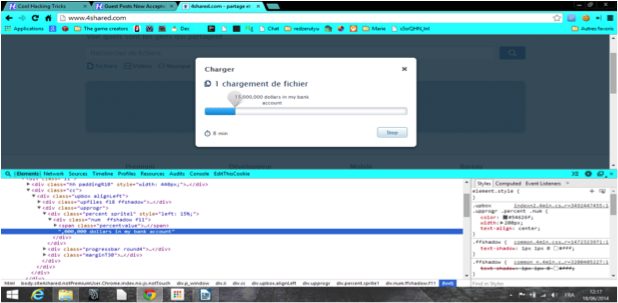
1. Modification The Text of a Webpage:
You can have a good time on webpages simply by changing the value of a (a text label). For example, go on the 4shared.com web site (a free file sharing site). Then produce an account if you do not have one (or simply connect with Google, Facebook or Twitter). once you are done, upload something that's heavy (more than 100 MB) by dragging and dropping it on the home page of 4shared. Then you'll be able to see an uploading status window on the screen. thus right-click on the proportion and click on on ''Inspect element''. Now you'll be able to see the percentage window that appears on the bottom of the web browser. There are to ways that : either you got the number otherwise you got the pointy icon. If you got the number, attempt to find the icon below. Then double-click on that and kind what you would like (Eg: '',000,000 dollars in my bank account'')


google chrome tricks 

2. Get a Non-Crypted password in JS/PhP code:

Some sites are not very safe and just verify the password directly in the PhP/JS code. Then, even if it become rare, you can get the password. Just follow these steps :

  1. Find the login form on the website you want to hack
  2. Right-click on it and then click on ''Inspect element''
  3. Search on the window that appeared ''<form'' and then ''action=''
  4. After it, there is a URL, If it ends by ''.js'', just copy it and paste it in the URL bar of your browser
  5. If it ends by ''.php'', type ''view-source:'' before pasting the URL
  6. Then search something like ''password'' in the code.
WARNING: This method works better with JS than with PHP. Sometimes, there is no URL after ''action='' but just a JS function. Then you have to press Ctrl+U to see the source and search for''password'' in the whole code.